




*Tunisia: Metameur , Medenine Tunisie
4111
*France: 28 Rue du Guet, Clamart 92140 FR
Want to grow your YouTube channel with a clearer strategy instead of guessing what to publish? vidIQ brings YouTube keyword research, competitor analysis, channel audits, video optimization, and AI-powered guidance into one creator-focused platform. Explore the tools below and see how they can help you plan smarter videos and learn from your channel data.
Exclusive saving for ClickTN readers
Visit vidIQ through our referral link, choose an eligible plan, and enter GRAB50 in the promo-code field at checkout. Confirm that the discount appears in the final price before completing your purchase.
Promo code: GRAB50 · Offer eligibility and duration are confirmed at checkout.
Growing a YouTube channel is not only about uploading more videos. Creators also need to choose topics people are searching for, understand why some videos outperform others, improve titles and thumbnails, and learn from competitors without simply copying them. That research can take hours when it is spread across multiple tools.
vidIQ brings many of these creator workflows into one platform. It combines YouTube-focused keyword research, channel and competitor insights, content ideas, video optimization tools, and AI-assisted guidance. In this 2026 review, we look at what the platform actually does, who benefits most, what the plans include, and where you should keep realistic expectations.
Make your next upload more informed
Explore keyword opportunities, study videos in your niche, and get channel-specific guidance with vidIQ.
Start with the free plan. Upgrade only if the additional tools fit your workflow.
vidIQ is a YouTube creator platform designed to help creators make more informed decisions before and after publishing. Instead of treating YouTube SEO as a list of tags, it helps you research demand, compare topic opportunities, review channel performance, study competitor activity, and improve the packaging of a video.
Its toolkit includes a web dashboard and browser extension, with mobile access for selected research and creator workflows. The exact tools and usage limits depend on the plan you choose.
Keyword Research is one of vidIQ’s most useful features for creators who want to plan videos around real audience interest. Enter a topic or phrase and review estimated search volume, competition, and an overall keyword score. You can also explore related keywords, matching terms, and questions that can become supporting video ideas.
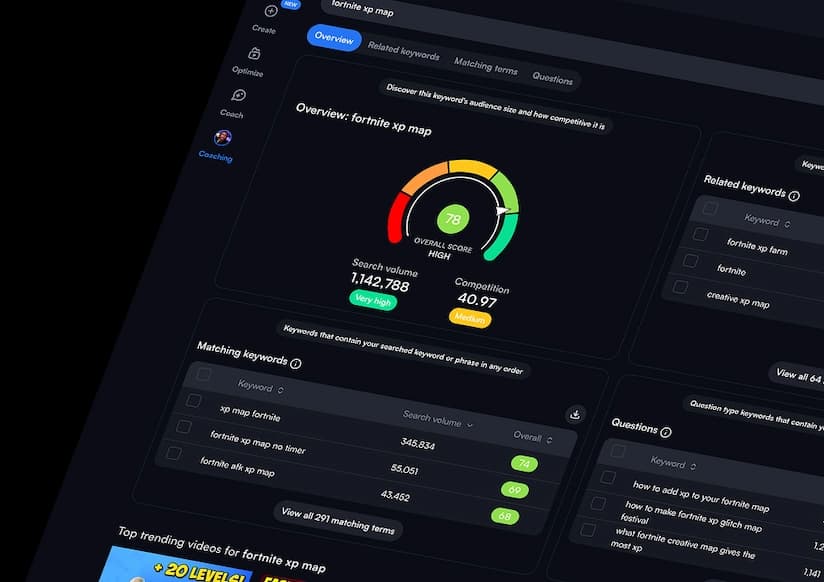
Example: A channel about home cooking could research a broad phrase such as “chicken recipes,” then compare more specific searches such as “crispy chicken thighs” or “easy chicken dinner for two.” A narrower phrase may have less search demand but also less competition and a clearer viewer intent.
The keyword score is useful for comparing opportunities, but it does not predict rankings or views. A strong keyword still needs a relevant video, a compelling title and thumbnail, and a viewer experience that satisfies the search.
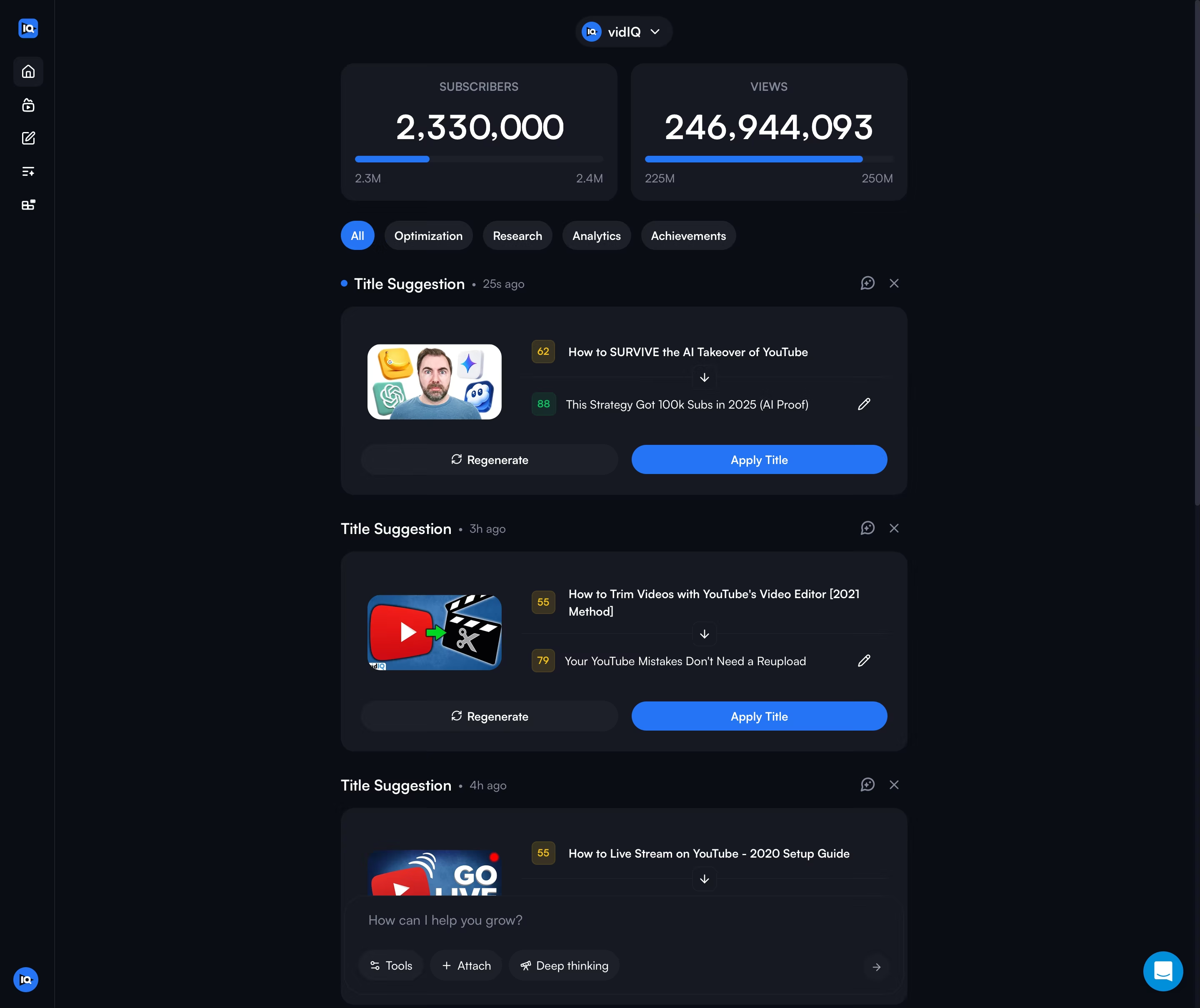
vidIQ’s AI Coach is more specialized than a general-purpose writing assistant. According to vidIQ, it can use channel context and performance signals to help diagnose stalled videos, review channel priorities, suggest titles, develop content plans, and provide next steps. Fast Mode is suited to quick questions, while Deep Thinking is intended for more detailed strategy and competitor-related analysis. Max Mode is reserved for eligible higher-tier plans.
That channel context is the important distinction: generic AI can brainstorm titles, but a tool connected to your channel data can make its suggestions more relevant to your existing content and performance. AI output can still be wrong or incomplete, so verify important metrics and use your own editorial judgment.
Channel Audit helps you understand what is working and what needs attention. vidIQ describes reports covering views, subscriber changes, watch time, engagement, top-performing videos, underperforming content, audience retention, and traffic sources. It can help you spot patterns such as a format that repeatedly attracts viewers or videos that generate views but few subscribers.

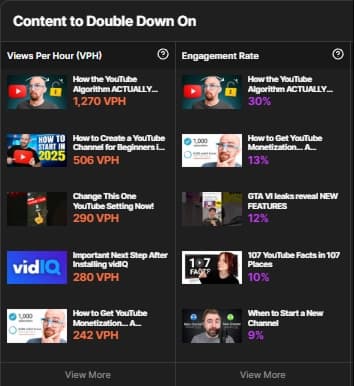
Use these insights to form a hypothesis, not to blindly repeat a successful video. Look for the reason it worked: topic demand, packaging, audience fit, retention, or timing.
The Competitors tool lets you track other public YouTube channels in your niche and compare performance over time. vidIQ highlights metrics such as views, subscribers, video count, average daily views, and top videos. You can also sort competitor videos by views or views per hour to find content that is gaining momentum.
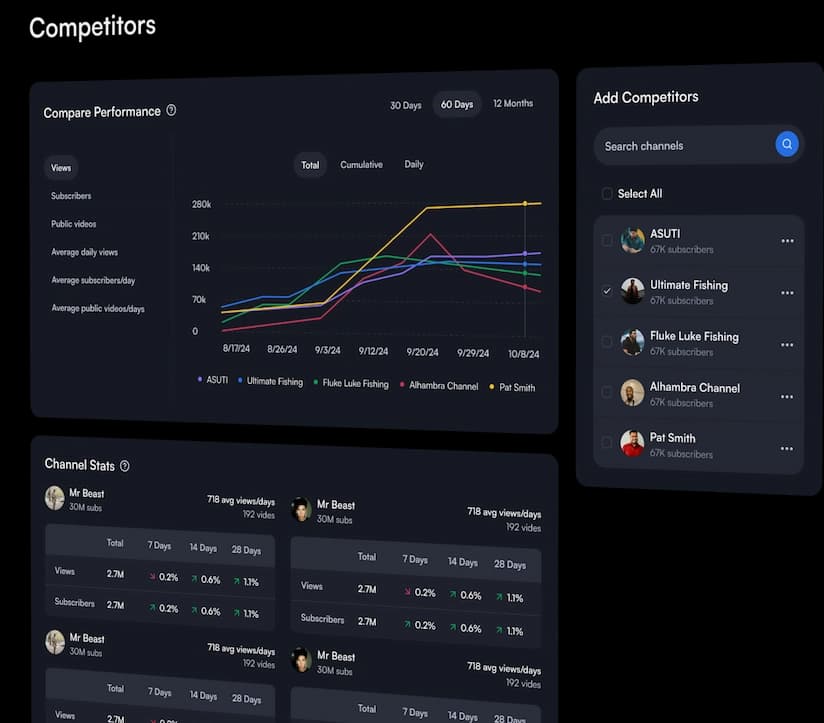
The right way to use competitor research is to identify unmet audience questions and content gaps. Do not copy another creator’s title, thumbnail, or script. Study the underlying topic and develop a more useful angle for your own audience.
When you are stuck for a topic, vidIQ’s Daily Ideas and Outliers tools can help surface content opportunities. Outliers are videos that perform unusually well compared with a channel’s typical results. This is valuable because a smaller channel’s breakout video can reveal a topic or format worth investigating, even if the creator does not have a huge audience.
Trend data moves quickly. Before producing a video around a trend, check that it fits your niche and that you can publish while the topic is still relevant.
vidIQ also provides tools for improving video titles, descriptions, tags, and thumbnails, plus optimization feedback through its browser extension. These features can make the publishing process more systematic: check whether the title communicates the topic clearly, whether the description supports the video, and whether the thumbnail gives viewers a reason to click.
Do not overvalue tags. They can provide context and help with misspellings, but they are not a substitute for a strong topic, title, thumbnail, and video. Likewise, a high optimization score does not guarantee that YouTube will recommend a video.
This process does not guarantee viral growth. It does help replace guesswork with a repeatable research and review routine. For a broader content plan that connects videos with other formats and channels, read our Content Marketing guide and Multichannel Marketing guide.
vidIQ offers a Free plan and paid plans such as Boost and Max. The official US pricing page currently lists Boost at $19 per month or $199 per year, and Max at $49 per month or $468 per year. The annual prices work out to lower monthly equivalents, but the full amount is billed annually. Local pricing, taxes, channel limits, and promotions may differ; always confirm the amount shown at checkout.
| Plan | Best for | What to know |
|---|---|---|
| Free | New creators testing the workflow | Core tools and 150 AI credits per month, with limits on some research results and competitor tracking. |
| Boost | Creators publishing consistently | More research access, 2,000 AI credits for a one-channel plan, deeper optimization and AI Coach features. |
| Max | Creators who need more AI capacity and deeper analysis | 6,000 AI credits for a one-channel plan, everything in Boost plus Max Mode and higher limits. |
Credit allowances and feature limits can vary by the number of connected channels and may change. Check the current official vidIQ plans and pricing before subscribing. If you are new to the platform, starting with Free is a sensible way to test whether its research workflow is useful before paying.
Ready to test the workflow?
Explore the available tools first. You can decide later whether a paid plan makes sense for your channel and publishing frequency.
Both vidIQ and TubeBuddy aim to help YouTube creators research and optimize videos. The best choice depends on the workflow you value most, the features available in the current plan, and how you prefer to work. vidIQ places strong emphasis on keyword discovery, outlier research, competitor insights, channel audits, and AI Coach. Compare the current feature lists and pricing of both products before committing; avoid choosing based on a single score or a broad claim that one tool is always better.
It may be less valuable if you rarely publish, do not use research insights, or expect software alone to generate an audience. In those cases, improve your content strategy first and revisit paid tools when you have a consistent publishing workflow.
vidIQ is worth considering if YouTube is an important channel for your business or creative work and you want a more structured way to research topics, evaluate competition, and learn from performance data. Its strongest proposition is the combination of keyword research, competitor insights, channel audits, and AI-assisted guidance in one creator-focused platform.
Our recommendation is straightforward: start with the Free plan, test Keyword Research and the tools that match your publishing workflow, and upgrade only when you can identify a clear benefit from the extra limits or features. Treat vidIQ as a decision-support toolkit—not a shortcut to guaranteed views, subscribers, or revenue.
Want to explore it? Use the ClickTN partner link below to visit vidIQ and check the plan that fits your channel.
Research smarter topics, understand your channel, and make your next upload with better information.
Claim 50% Off With GRAB50 — Visit vidIQ →
Use code GRAB50 at checkout. Confirm the discount and renewal price before paying.
Yes. vidIQ has a Free plan with limited access to core tools and a monthly AI credit allowance. Paid plans unlock higher limits and additional features.
No. vidIQ provides research, analytics, and optimization guidance. Results depend on the topic, video quality, audience response, packaging, and many other factors.
It can be. Smaller channels can use keyword research and competitor analysis to find focused topics and learn from videos that outperform their channel’s usual results. Start with the free plan to assess the value.
YouTube Studio is YouTube’s own platform for managing a channel and viewing its first-party analytics. vidIQ adds research and creator tools such as keyword opportunity analysis, competitor tracking, outlier discovery, optimization guidance, and AI Coach.
Most beginners should start with Free. Upgrade when you consistently use the tools and need the higher limits or paid features.
vidIQ offers tools for short-form content, including clipping and AI-assisted creation features on eligible plans. Check the current plan details and usage limits before relying on a particular feature.
Official resources: vidIQ Features · Keyword Research · AI Coach · Channel Audit · Competitor Tools · Plans & Pricing.
Last reviewed: November 2026. Product features, plan limits, prices, and promotional offers may change. Confirm current details on vidIQ’s official website and verify the discount at checkout.
Hatem Dbabra is the Founder of ClickTN, a digital marketing agency focused on SEO, online advertising, and digital growth. He covers digital marketing platforms and business tools, with an emphasis on practical use cases for creators and businesses.
This article contains an affiliate link to vidIQ. If you sign up or purchase through our referral link, ClickTN may earn a commission at no additional cost to you. This does not affect our editorial assessment. We aim to explain the platform’s benefits, limitations, and relevant terms so you can make an informed decision.
*Tunisia: Metameur , Medenine Tunisie
4111
*France: 28 Rue du Guet, Clamart 92140 FR
