

Software & Automation
Zapier Review 2026: Zapier connects business apps and automates repetitive work. This independent guide explains how its workflows work, what its plans include, how task-based pricing affects costs, and when it makes sense for a small business, agency, or marketing team.
Explore workflow automation
See what you can automate with Zapier
Explore Zapier’s plans and app connections, then decide whether it fits your business processes.
Affiliate link: ClickTN may earn a commission if you sign up through this link, at no extra cost to you.
What is Zapier?
Zapier is a workflow automation platform that connects applications so information can move between them when a defined event occurs. For example, instead of manually copying a new enquiry from a form into a CRM, a Zap can create the CRM record and notify the right person automatically.
Zapier’s integration directory covers more than 9,000 apps. The available triggers, actions, and search events vary by app, so check the exact integration before designing a workflow. Zapier also offers related products such as Tables, Forms, and AI-powered automation tools. See Zapier’s product overview and the app directory.
How does Zapier work?
A standard Zap starts with a trigger and then performs one or more actions:
- Trigger: the event that starts the automation, such as a new form response, a new CRM lead, or a spreadsheet row.
- Action: the task Zapier performs, such as creating a contact, sending a message, or updating a record.
- Test and publish: you map the required fields, test with sample data, and turn the Zap on.
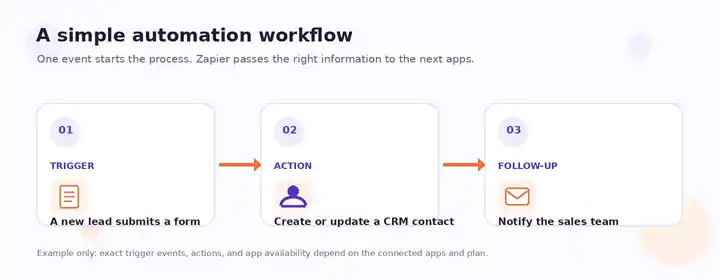

Some triggers use polling, where Zapier checks an app periodically for new data; other integrations support instant triggers. Zapier’s current documentation lists polling intervals of 15 minutes on Free, 2 minutes on Professional, and 1 minute on Team and Enterprise. These figures apply to polling triggers, not as a guarantee that every workflow completes within that time. Read how Zap triggers work.
Key Zapier features
1. Multi-app workflow automation
Connect marketing, sales, support, project management, and reporting apps without building a custom integration for every handoff. A team can send lead data from a form to a CRM, create a task in a project tool, and alert a shared channel, as long as the required events are supported.
2. Multi-step Zaps, Filters, and Paths
More advanced workflows can perform several actions and apply conditional logic. For example, a lead can be routed to a different sales owner based on its region or source. Multi-step Zaps and some advanced controls depend on the plan.
3. Webhooks and developer options
Webhooks and developer tools can connect services that do not have the exact prebuilt action you need. They provide flexibility, but usually require API knowledge, data mapping, and more careful testing.
4. Tables and Forms
Zapier Tables can store structured information used in workflows, while Forms can collect data and initiate processes. Limits and availability depend on the product and plan.
5. AI-powered automation
Zapier’s wider product range includes AI-related tools such as Agents, Chatbots, and Zapier MCP. They can help connect AI-driven tasks with business apps, but feature access, usage quotas, and pricing vary. Confirm what is included in your plan before moving a workflow into production.
Practical Zapier use cases for businesses
Lead management
Send new website enquiries to a CRM, assign an owner, and alert sales so leads are not left in an inbox.
Email marketing
Pass new subscribers or customer events from supported apps into an email marketing workflow, subject to consent and the receiving platform’s rules.
Client onboarding
When a deal reaches a defined stage, create project tasks, notify the delivery team, and prepare onboarding steps.
Customer support
Route support requests, notify the right team, and keep related customer records updated across connected tools.
Reporting and operations
Move selected information into a spreadsheet or database and alert stakeholders when important records change.
E-commerce operations
Connect supported store events with fulfilment, customer communication, inventory, or reporting processes.
These are examples, not a promise that every integration supports every event. Verify the exact trigger and action in the Zapier app directory before committing to a workflow.
Zapier pricing in 2026: what should you expect?
Zapier offers a Free plan and paid tiers for individuals, teams, and larger organisations. The following are headline starting prices displayed on Zapier’s pricing page when this article was updated. Your final price can depend on task volume, billing frequency, and plan selection. Check the live pricing page before subscribing.
| Plan | Headline starting price | Best suited to | Notable features |
|---|---|---|---|
| Free | $0/month | Testing and light personal workflows | 100 tasks per month; two-step Zaps |
| Professional | From $19.99/month | Individuals who need more advanced automations | Multi-step Zaps, premium apps, and advanced features |
| Team | From $69/month | Teams collaborating on shared workflows | Team collaboration, shared Zaps and folders, shared app connections |
| Enterprise | Contact sales | Organisations with advanced governance needs | Advanced administration, security, and support options |
Important: starting prices are not a quote for every usage level or billing cycle. Compare task limits, features, and total annual cost on the official Zapier pricing page.
Understand Zapier tasks before choosing a plan
Task usage is one of the most important factors when estimating Zapier’s cost. In general, each successful action performed by a Zap counts as one task. A workflow that completes three counted actions may therefore use three tasks each time it runs. Some steps do not count, including triggers, test runs, Filters, Paths, and certain built-in tools such as Formatter. Zapier Agents have a separate activity quota. See the official guide to how task usage is measured.
Compare before you commit
Find the right automation setup for your team
Check supported integrations, plan limits, and task usage against your actual workflow requirements.
This is an affiliate link. ClickTN may earn a commission at no additional cost to you.
Zapier pros and cons
Advantages
- Connects a broad catalogue of business apps.
- Many common workflows can be built without coding.
- Supports multi-step workflows and conditional logic on eligible plans.
- Includes data, forms, and AI-related tools in its wider product ecosystem.
- Can reduce repetitive copying and manual handoffs.
Limitations to consider
- Costs can increase as successful actions and task usage grow.
- Some advanced features require a paid plan.
- Trigger speed and available events differ by app.
- Complex workflows need testing, monitoring, and error handling.
- Not every app exposes every operation through its integration.
Who should use Zapier?
Zapier is worth evaluating if your business relies on multiple cloud apps and employees repeatedly move the same information between them. It can be particularly useful for small businesses, marketing teams, agencies, sales teams, and operations staff who want to automate routine processes without building every connection from scratch.
It may be less suitable when workflows require highly customised logic, large action volumes on a strict budget, or integrations that are not available in the app directory. Compare the total cost and technical flexibility of alternatives before choosing.
How to get started with Zapier
- Choose one repetitive process. Start with a measurable task, such as sending every new enquiry to your CRM.
- Check the app connections. Confirm that the exact trigger and action are supported.
- Build a small Zap. Add the trigger and action, then map only the fields you need.
- Test with sample data. Confirm that the right information reaches the right destination and is not shared unnecessarily.
- Monitor usage and errors. Review task consumption and run history before expanding the workflow.
Frequently asked questions about Zapier
Is Zapier free?
Yes. Zapier lists a Free plan at $0 per month with 100 tasks per month and two-step Zaps. It can be useful for trying basic workflows, but check the current limits against your intended use.
Do I need coding skills to use Zapier?
No coding is required for many standard automations. Advanced APIs, webhooks, custom integrations, and complex data handling may benefit from technical knowledge.
How many apps does Zapier connect?
Zapier advertises more than 9,000 app integrations. Check the app directory to confirm that your specific trigger and action are available.
What is a task in Zapier?
A task is generally a successful action performed by a Zap. If a workflow completes multiple counted actions, each successful action may use a task. Several built-in steps are excluded; check Zapier’s current task-usage documentation.
Is Zapier worth paying for?
It depends on how much manual work it removes and how many tasks your workflows consume. Test the process, estimate monthly task usage, and compare that value with the current plan cost.
Can Zapier connect my CRM and email marketing platform?
It may be possible when both applications have the required triggers and actions. Review the app directory and check the limitations of each integration before setting up the workflow. You can also read ClickTN’s guides to HubSpot CRM and Marketing and Brevo email marketing and automation.
Our verdict: is Zapier worth considering in 2026?
Zapier is a strong option to evaluate when you need to connect common business apps and automate repeatable tasks without building custom integrations for every process. Its broad app catalogue, workflow logic, and expanding AI tools make it relevant to small teams and growing organisations.
The key decision is not simply the number of integrations. Check whether Zapier supports the exact events you need, whether your plan includes the necessary features, and whether the expected task volume makes the cost worthwhile. Start with one measurable workflow, test it carefully, and scale after reviewing the results.
Start with one workflow
Explore Zapier and see what your business can automate
Review the available plans and integrations before choosing the setup that fits your needs.
Affiliate disclosure: ClickTN may receive a commission if you sign up through this link, at no additional cost to you. ClickTN is not Zapier and this page is not an official Zapier website.
Related ClickTN Guides: Build a Connected Marketing Stack
Zapier is most useful when it connects the tools a business already relies on. Explore these related ClickTN guides to understand the platforms that can work alongside workflow automation:
- Brevo Review 2026 — email marketing, CRM, and customer communication automation.
- Brevo Email Marketing Guide — email, SMS, and lifecycle campaign workflows.
- HubSpot CRM & Marketing Guide — customer records, sales pipelines, and marketing operations.
- HubSpot AI Tools Guide — AI-assisted CRM and business workflows.
- HubSpot Marketing Hub & AI Marketing Tools — marketing campaigns, analytics, and automation.
- Framework360 Review — compare an all-in-one CRM and marketing platform with a connected app stack.
- SMTP.com Review — understand dedicated email delivery infrastructure alongside workflow automation.
About the author
Hatem Dbabra is the founder of ClickTN, a digital marketing agency focused on SEO, digital advertising, automation, and practical business technology. Learn more about ClickTN.
Sources and further reading
- Zapier Help Center: What is Zapier?
- Zapier Help Center: What is a Zap?
- Zapier Help Center: How Zap triggers work
- Zapier Help Center: Task usage
- Zapier: Plans and pricing
- Zapier: Ambassador & Affiliate Program Terms
- U.S. Federal Trade Commission: Endorsement and affiliate disclosure guidance
Editorial note: This guide is an independent overview based on Zapier’s public product documentation, pricing information, and published terms checked on November 13, 2026. It is not a hands-on performance test. Features, prices, and plan limits can change. Check the linked official pages before purchasing.